
Your OpenCart store is generating data every minute. Orders land, stock moves, carts go cold, and revenue shifts before you notice. The data is never the problem. Getting to it is.
Most admins spend more time navigating report pages than actually reading results. That friction adds up fast, and for anyone running daily store checks, the OpenCart admin panel was simply not built for speed. An AI admin assistant for OpenCart changes that workflow at the root, not by adding another dashboard, but by replacing navigation with a conversation.
Why OpenCart Back Office Reporting Creates Daily Friction
The native reporting setup in OpenCart works well enough for monthly reviews. For daily operations, it is a different story. Checking today’s order count means going to Reports, picking a category, setting a date range, and loading the page. Checking stock status means starting the whole sequence again somewhere else.
Forum threads on opencart.com repeat this complaint consistently. Merchants ask why there is no quick stock view, why pulling a basic abandoned cart count requires four clicks, and why nothing in the default setup gives them a single place for morning checks. The underlying data exists. The navigation overhead is the issue.
For multi-admin stores, this gets worse. Different staff members run the same checks independently, with no shared log of what was pulled or when.
How the OpenCart AI Admin Assistant Replaces Report Navigation
The Knowband OpenCart AI Admin Assistant places a chat widget directly inside the OpenCart admin panel. Type a question in plain English queries, “How many orders were placed today?” or “Which products are at zero stock right now?”, and get a direct answer pulled from live store data in seconds. No SQL. No report page. No date range picker.
Each response is generated by connecting to pre-built read-only MySQL views that organise the relevant data by domain: orders, customers, stock levels, abandoned carts, coupons, product variants, and more. The AI has no path to raw tables, and nothing sent through the chat can write, update, or delete any store record. The data is live; the access is read-only.
Three AI providers are supported: OpenAI (ChatGPT), Anthropic Claude, and Google Gemini, and you connect whichever one you already have an API key for.
What You Can Actually Ask the OpenCart AI Admin Assistant
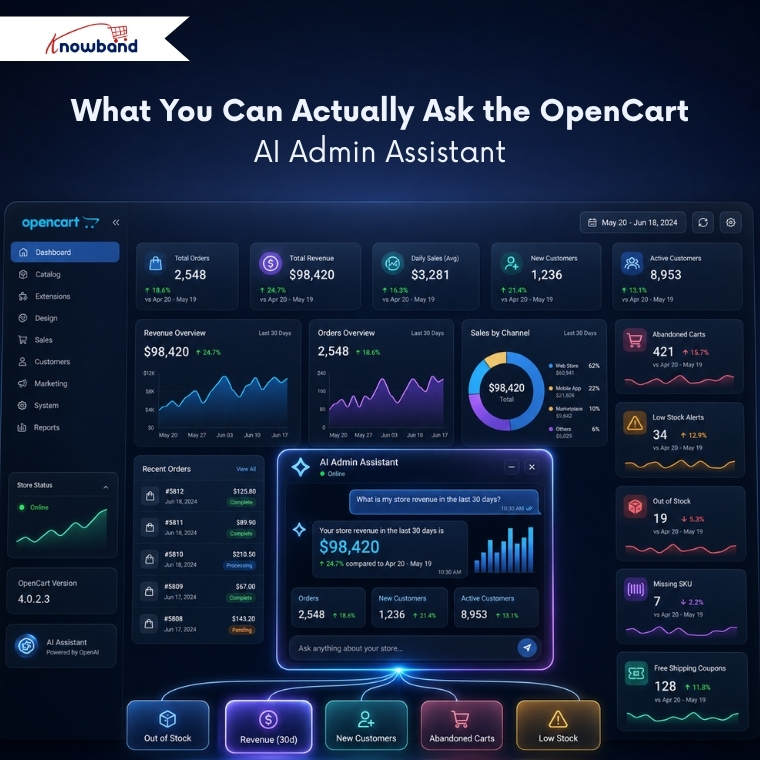
The assistant covers the data domains that matter for day-to-day store management. Orders and revenue totals, cancelled order counts, new customer registrations this month, active customer figures, abandoned cart numbers over any period, low-stock alerts, out-of-stock product lists, products missing a SKU reference, and which coupons currently offer free shipping.
Ten predefined chips come built into the widget, one-tap shortcuts that send a stored question to the AI without any typing. Tap “Out of Stock”, and the answer arrives instantly. Tap “Revenue (30d)” and the figure for the past month comes back in one line. For teams running the same checks every morning, this cuts the daily store review to under a minute.
Custom chips can be added from the configuration panel. Write the question, give the chip a label, set its position, and save. Every admin with access can then use it with a single tap.
AI can also simplify the way store owners interact with ecommerce data. Instead of manually searching through different sections of the admin panel or working with SQL queries, an OpenCart AI back-office extension can help make store information easier to access and understand
The SQL Visibility Feature That Makes AI-Generated Answers Trustworthy
One fair concern with AI-generated data answers is verifiability. The Show SQL Query toggle addresses this directly. Enable it, and the exact SQL query behind each answer appears in the chat below the result. Any admin can read how the data was fetched without touching a query tool or asking a developer.
The Allow SQL Edit and Re-run setting goes further. The SQL displayed under any answer becomes editable in the chat. Change a date range, adjust a filter threshold, or swap a product category and run the modified query on the spot, without typing a new question. This is what makes the OpenCart AI Sales Analytics Plugin genuinely useful for iterative analysis, not just one-off lookups.
The schema cache handles the database structure mapping automatically, building on the first chat session and refreshing on a configurable schedule. After any OpenCart upgrade or new extension install, a single button rebuilds it on demand.
Access Control and Query History for Multi-Admin Stores
Not every staff member needs access to every data point. The Access Control tab handles this with role-based access, tick which employee profiles, Logistician, Salesman, Translator, or any custom role, should see the assistant. Profiles left unticked see no widget after logging in. SuperAdmin access is always on.
The query history log captures every question asked: the employee name, time, number of rows returned, response time in milliseconds, the AI provider used, and the SQL that ran. The log is filterable by date and status and exports to CSV or Excel. For any store where data access accountability matters, that log answers the question before anyone has to ask it.
According to Baymard Institute, the average documented cart abandonment rate sits above 70%. With the OpenCart Back Office AI pulling that figure on demand, operations staff stop guessing and start acting on current numbers rather than last week’s report.
Setting Up the OpenCart AI Admin Assistant on OpenCart 3.x
The first required step after installation is connecting an AI provider from the AI Provider tab, pasting in your API key, selecting a model, and saving.
For routine daily admin queries, lighter models work well and cost less per query. Claude Haiku 4.5, GPT-4o Mini, and Gemini Flash handle standard checks quickly. For queries that span multiple joined tables or involve complex cross-domain analysis, stronger models like Claude Sonnet 4.6 or GPT-4o produce more reliable results.
Temperature controls response consistency. For store data queries where factual precision matters, 0.3 or below is the practical starting point.
The Knowband configuration panel covers every tab in detail. Once connected, the assistant runs entirely inside the admin, no external dashboard, no separate login, no third-party reporting platform. Store data has never been the bottleneck. If your team is still spending time navigating to it, an OpenCart AI sales analytics plugin is the faster path to the same answers.

