
Many OpenCart merchants rely on support tickets, product reviews, and occasional emails to understand customer feedback. Research says that if a customer is not satisfied, they often just leave without complaint. No reviews, just silent disappointment. That’s a significant amount of data just walking away, and most stores don’t notice until conversion rates start dropping. That’s why adding a structured OpenCart Customer Feedback Plugin to your OpenCart store is essential. Businesses that are actively working on gathering and improving based on customer experience feedback notice a 25% higher retention rate. With a good OpenCart Customer Feedback Plugin, like Knowband’s OpenCart Form Studio, you can have a working form up and running in less than 15 minutes: no code, no theme edits, and no developer needed.
Here are the top 5 feedback forms every OpenCart store should integrate to better understand customer needs, improve user experience, and increase customer retention.
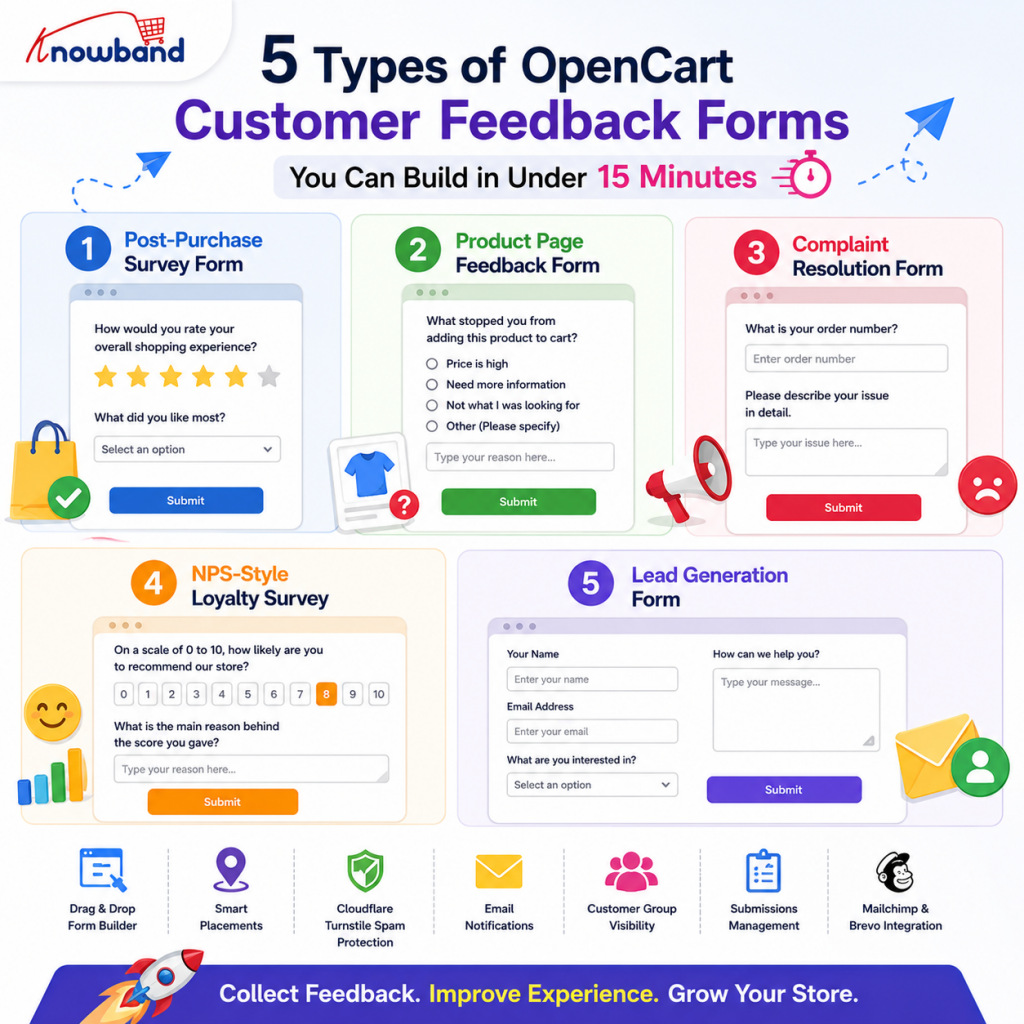
1. Post-Purchase Survey Form to Capture Satisfaction While It’s Fresh
The best time to ask a customer how their experience went is right after checkout, not a week later when the memory has faded. A post-purchase survey placed on the order confirmation page or sent via auto-responder captures honest responses while the experience is still top of mind.
A basic customer satisfaction survey for this stage needs four to six fields at most: an overall rating (radio buttons work well), a short dropdown for what they purchased, a textarea for open comments, and an email if you want to follow up.
Using a drag-and-drop form builder in OpenCart, you can create this form in minutes. Place it on the Checkout layout via the Placements tab, and it appears automatically after every completed order without any theme modification.
Questions You Can Ask:
- How would you rate your overall shopping experience with us?
- Did you encounter any issues while placing your order?
- How satisfied are you with the checkout process?
- What did you like most about your shopping experience?
- Is there anything we could have done better with your order?
2. Product Page Feedback Form to Understand Why Buyers Hesitate
A visitor who lands on your product page and leaves without buying is telling you something. The problem is you don’t know “why”. Product page feedback forms close that gap by asking visitors directly.
This form type works best when it’s user-friendly. A floating button on the product page that opens as a pop-up on click keeps the browsing experience intact while still collecting structured responses. Two or three fields, a radio button for the issue type, a short textarea for detail, and an optional email field are enough. Anything longer and visitors won’t complete it.
With a good OpenCart Customer Feedback Plugin, you can easily configure the placement of the “form button” of the product page via the Settings tab. The form appears on every product page instantly.
Questions You Can Ask:
- What stopped you from adding this product to your cart today?
- Were the product images and description detailed enough to make a decision?
- What’s the most interesting feature of this product to you?
- How confident are you in the quality of this product based on what you see here?
- Would this page be more helpful with a size guide, comparison chart, or video demo?
3. Complaint Resolution Form to Turn Unhappy Customers Into Loyal Ones
A customer who complains is still a customer. A dedicated complaint resolution form gives unhappy buyers a structured channel to report issues instead of heading straight to a public review platform. When the form asks for the order number, complaint category, and a clear description upfront, your team has everything needed to act without a back-and-forth exchange. That speed is what turns a bad experience into a recovered relationship.
With the OpenCart Form Builder, you can place this form on the Account layout so logged-in customers find it easily after a purchase. Set up the admin email notification to route directly to your customer service team, and enable the auto-responder so the buyer gets an immediate acknowledgment. No complaint sits in silence. An OpenCart Customer Feedback Plugin that handles complaint routing this way removes the gap between a frustrated customer and a resolution.
Questions You Can Ask:
- What is your order number and the date of your purchase?
- Which category best describes your complaint?
- Please tell us what went wrong and how it impacted your experience.
- Have you contacted us about this issue? If so, what was the outcome?
- What would be a fair resolution in this case, according to you?
4. NPS-Style Loyalty Survey to Identify Your Most Valuable Customers
Sometimes one question can tell you a lot. An NPS survey asks customers how likely they are to recommend your store to a friend, giving you a way to measure customer loyalty and find out where the shopping experience could be improved.
For an OpenCart store, an NPS-style form using radio buttons (0–10 scale) with a conditional textarea for the reasoning works without any custom logic. Place it on the Account layout so it appears when logged-in customers visit their account page.
The OpenCart Survey Plugin also lets you restrict form visibility by customer group. That means you can target this survey at repeat buyers only, keeping it out of sight for first-time customers who haven’t had enough interaction to give a meaningful response.
Questions You Can Ask:
- On a scale of 0 to 10, how likely are you to recommend our store to a friend or colleague?
- What is the main reason behind the score you gave?
- Which part of your experience with us stood out the most?
- Has your satisfaction with our store improved, stayed the same, or declined since your first order?
- Is there one specific change we could make that would raise your score?
5. Lead Generation Form to Turn Interested Visitors into Future Customers
Not every visitor who lands on your store is ready to buy right now. Some are comparing options, some are researching for a future purchase, and some want to ask a question before they commit. Without a structured way to capture that interest, all of it disappears the moment they close the tab.
A lead generation form gives those visitors somewhere to go. Keep the form simple: a name, email, what they are looking for, and an optional message field is enough to start a conversation. The goal is not to collect every detail upfront but to get a response you can follow up on. Customers who fill out a form have already shown intent, which makes them far warmer than any cold outreach.
With the OpenCart Survey Plugin, you can place this form on the homepage so it is visible to visitors at the right moment in their browsing journey. Use the slug feature to give it a page of its own if you want to link to it from a campaign or a social post. Every submission lands in the form management panel, where your team can read and reply directly from the module backend. Using an OpenCart Form Generator Plugin for this purpose means the entire setup, from form fields to placement, is handled without writing a single line of code.
Questions You Can Ask:
- What product/service are you interested in today?
- Have you bought from us before, or is this your first contact with us?
- What’s the best way to get back to you, and when are you usually available?
- What problem are you looking to solve?
- Is there anything else you would like us to know before we get in touch?
How an OpenCart Customer Feedback Plugin Helps Manage All These Forms
Every form above serves a different purpose, separate placements, separate email routing, and separate thank-you pages. But managing multiple forms doesn’t create extra hassle. The Knowband OpenCart Form Studio manages them all from one panel: one place to check submissions, one place to update fields, one place to toggle a form on or off during peak seasons or promotions.
Spam protection runs via Cloudflare Turnstile, which blocks bot submissions silently without showing visitors any CAPTCHA challenge. Submitted emails sync directly to Mailchimp or Brevo if you’re running email marketing alongside the store.
If you’re running an OpenCart store and haven’t set up structured feedback collection yet, the OpenCart Form Generator Plugin and OpenCart Form Builder extension together cover all five of these form types and more, with no developer or custom code, and most forms are ready in a single working session.
For more such reads, you can visit:


