
Most guides on connecting OpenCart to Etsy skip the part merchants actually want to know: how much time will this take before the first product is live? The answer depends on whether you already have an Etsy seller account, how many products you are listing, and how much of the setup you have prepared in advance. With a proper OpenCart Etsy connector solution, the technical connection itself takes under an hour. The surrounding setup, account, API credentials, shipping templates, and category mapping are what determine the total time.
Etsy had 90 million active buyers in 2023, and a survey found that 79% of them come specifically to find something they cannot find elsewhere. For OpenCart merchants selling handmade, unique, or niche products, that intent-driven audience is genuinely different from what Google Shopping or a standalone store attracts. The setup time is worth understanding clearly before starting.
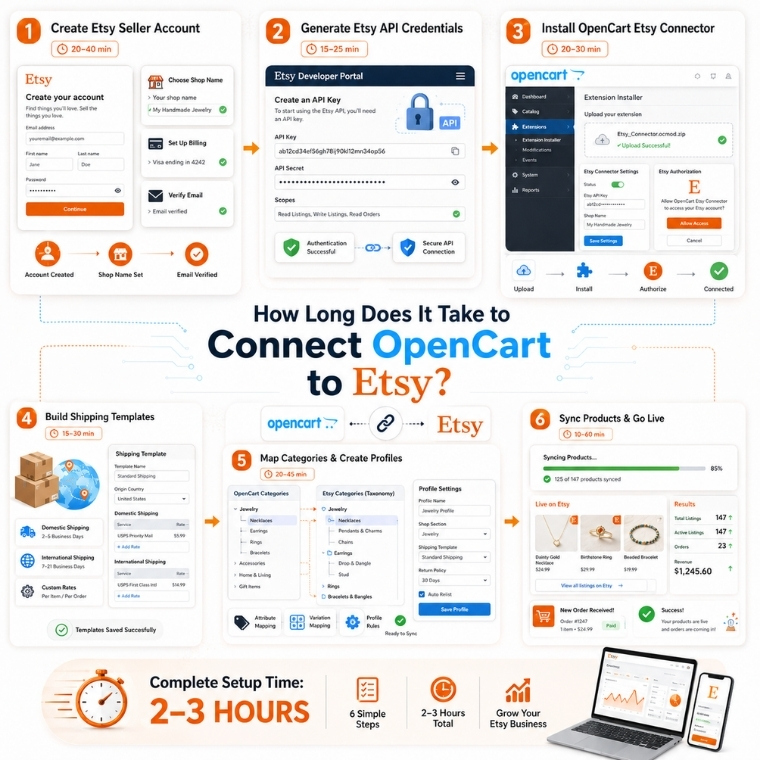
Step 1: Creating Your Etsy Seller Account, 20 to 40 Minutes
If you do not already have an Etsy seller account, this is where you start, and it is the step most guides treat as a minor detail. The registration form is straightforward, but Etsy requires you to complete several sections before the account is active: shop preferences, shop name selection, initial product listing, payment setup, and billing details.
The shop name step catches many merchants off guard. Etsy checks availability in real time, and names must be 4-20 characters with no spaces. If your business name is already taken, you will spend time testing variations. Budget 30-40 minutes for the full account setup, including email verification.
If you already have an active Etsy seller account, skip this entirely.
Step 2: Creating an Etsy App and Getting API Credentials, 15 to 25 Minutes
Connecting OpenCart to Etsy requires API authentication. You cannot skip this step; it is how the two platforms verify that the connection is authorised. Go to the Etsy developer portal, register an application, accept the terms, and retrieve your API Key and API Secret.
One important detail: during the app creation form, leave the “Inventory Management Compatibility” checkbox checked. Missing this creates errors later when syncing product variations. The credentials page appears immediately after registration. Copy both values before navigating away, as retrieving them later requires going back into the developer console. This step reliably takes 15-25 minutes for a first-time user.
Step 3: Installing and Configuring the OpenCart Etsy Connector, 20 to 30 Minutes
After purchase, the Knowband OpenCart Etsy Connector installs via FTP upload to your root directory. The OpenCart Etsy Integration Plugin appears in your Extensions list once the files are in place. Open the General Settings tab, enter your API Key and API Secret, select your Etsy currency and default language, and save. The OpenCart Etsy Integration Plugin redirects you to Etsy to authorise the connection, click Allow Access, and you return to the admin panel with the connection confirmed.
The configuration side covers order status mapping (how Etsy order statuses align with your OpenCart statuses) and any secondary languages you want to sync. None of this is technically complex, but reading through each option once before saving prevents having to reconfigure later.
Step 4: Building Shipping Templates, 15 to 30 Minutes
Etsy requires shipping information before any product can go live. The OpenCart Etsy Integration Extension handles this through shipping templates. You create them in the extension backend, configure the origin country, primary cost, additional item cost, and processing time, then sync them to your Etsy shop.
Most merchants need at least two templates: one for domestic shipping and one for international. If you ship to multiple regions with different rates, build those templates now. Skipping this step means products will not list correctly. Once templates exist in the extension, the Shipping Template Synchronisation cron pushes them to Etsy in one click.
Step 5: Creating Profiles and Mapping Categories, 20 to 45 Minutes
Profiles are how the OpenCart Etsy Integration Plugin organises which products go to Etsy and under which category. Each profile maps one or more OpenCart store categories to a single Etsy category. Within the profile, you also set product-level attributes Etsy requires, Who Made, When Made, What Is It, Recipient, Occasion, fields that do not exist in OpenCart but are mandatory on Etsy for most categories.
The category mapping step is where merchants underestimate the time. Etsy’s category taxonomy is specific and does not always align cleanly with OpenCart categories. A product category you call “Jewellery” in OpenCart maps to a multi-level Etsy path that requires selecting a subcategory and sometimes a sub-subcategory. Work through this methodically rather than rushing it; incorrect category mapping reduces Etsy search visibility for your listings.
Step 6: Syncing Products and Going Live, 10 to 60 Minutes Depending on Catalogue Size
With profiles configured, the product synchronisation cron pushes your listed products to Etsy. For a catalogue of 50-100 products, this runs in under 10 minutes. Larger catalogues take longer but run in the background; you do not need to watch them complete.
One thing worth knowing before your first sync: your OpenCart product titles will not work well on Etsy. Etsy search operates on long, specific buyer phrases, “personalised copper ring women minimalist” rather than “copper ring.” A title written for your store homepage will get buried in Etsy results. The OpenCart Etsy Connector includes a custom product details feature that lets you write separate Etsy-specific titles and descriptions per listing without touching your OpenCart product pages. Use it. Spend time here; it directly affects how quickly sales begin.
Realistic Total Time: 2 to 3 Hours for First-Time Setup
Breaking it down honestly:
- Etsy seller account (if new): 20-40 minutes
- API app creation and credentials: 15-25 minutes
- Extension installation and configuration: 20-30 minutes
- Shipping templates: 15-30 minutes
- Profile creation and category mapping: 20-45 minutes
- Product sync and title optimisation: 10-60 minutes
The full process from zero to live listings runs 2-3 hours for a merchant doing it for the first time with a moderate catalogue size. A merchant with an existing Etsy account and a small catalogue can be live in under 90 minutes. The time investment is front-loaded; once cron jobs are configured, inventory synchronisation, order imports, and order status updates run automatically without manual intervention.
After that initial setup, the order volume improvement can be significant. One merchant saw a 31% growth in monthly orders within 45 days of going live on Etsy with the same products at the same prices, simply by reaching a different pool of buyers who were already shopping for what she made.
For OpenCart merchants ready to start the process, the OpenCart Etsy Integration Extension from Knowband includes free installation support and three months of post-purchase technical assistance, which removes the troubleshooting risk from the setup time equation entirely.
For more such reads, you can visit:


